
Schedule
See who's where, all week
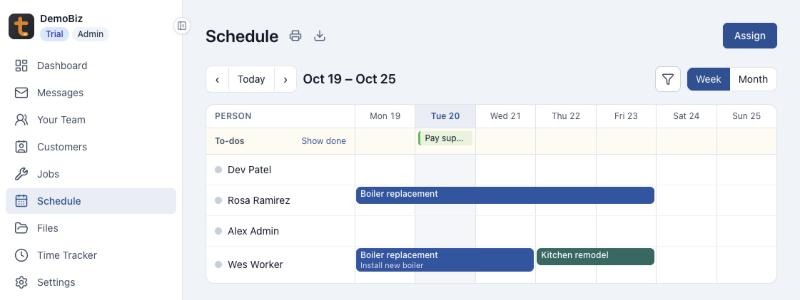
Assign people to jobs, and to the exact step they are working on. Switch between week and month, and keep to-dos on the same calendar.
What you get
- Each job keeps its colour, so the week reads at a glance
- Schedule crew who never sign in, like a seasonal helper
- Print the week for the shop wall, or export it to CSV
Assignments down to the step
Put someone on a job for a day or a run of days, and link it to a step from the job’s timeline. A step with people booked shows as Upcoming on the timeline, then In progress once its first day comes.
To-dos and notes on the calendar
Add a to-do for a day, for a job or for the whole company, and tick it off when it’s done. Assignments and to-dos can carry notes, which show on the calendar and on the printout.
Filters for a busy week
Hide jobs or people you don’t need to see. A badge on the filter shows how many are hidden, so nothing goes missing by accident.
Everyone on the schedule
Add team members who don’t sign in, with a name, contact details, a staff number to sort by, and their own colour. Invite them to sign in later, and their history comes with them.
More features
- Sales PipelineEvery job you’re chasing, and the next step on each.
- Jobs and Job TimelinePlan each job step by step, and watch it move.
- Cost SheetsPrice, materials, and labor hours, room by room.
- Time TrackerHours in, timesheets approved, payroll ready.
- MessagesTalk to your team and your customers in one place.
- FilesQuotes, plans, and photos, shared with the right people.
See Tailgate with your own jobs
Leave your email and phone number, and we'll walk you through a live demo business with real jobs, schedules, and timesheets.