
Cost Sheets
Know your margin before you start
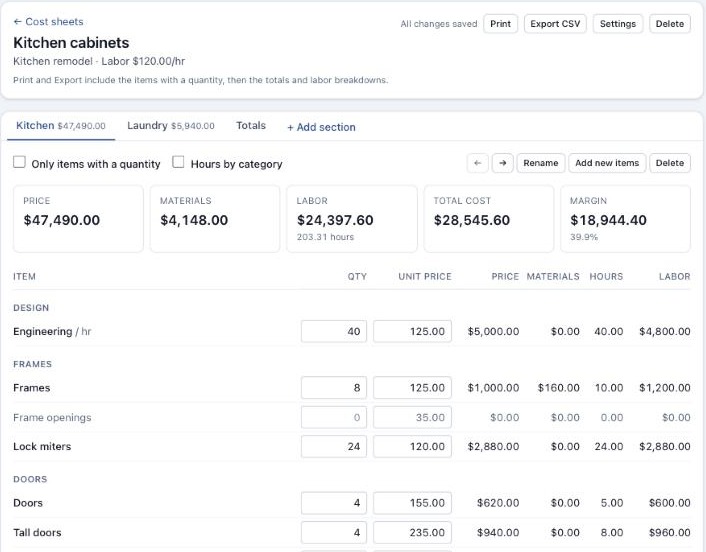
Break a job into rooms or areas, type in the quantities, and watch the price, material cost, labor hours, and margin add up as you go.
What you get
- Type a quantity, press Enter for the next item, and the totals keep up
- Changes save on their own as you work
- Print the sheet, or export it to CSV
Your items, your hours
Each item has a price, a material cost, and labor hours per unit by category: Frames, Doors, Finishing, and so on. An item can count others, like finishing that adds up every frame and door. Start from a cabinet shop’s catalog of 34 items and 13 labor categories, or build your own.
A section for every room
Add a section per room or area, like Kitchen and Laundry. Each one copies your items, so changing a price later never changes a sheet you’ve already costed.
Totals you can act on
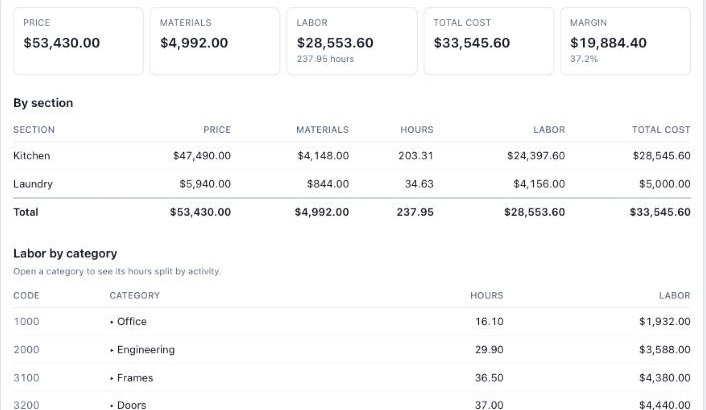
The Totals tab shows price, materials, labor, total cost, and margin for the whole job and for each section, with labor hours split by category and activity.
Your labor rate
Each sheet has its own labor cost per hour, starting from your usual rate; change it and every hour is re-costed. Cost sheets carry your costs, so team members never see them.
More features
- Sales PipelineEvery job you’re chasing, and the next step on each.
- ScheduleSee who is where, all week.
- Jobs and Job TimelinePlan each job step by step, and watch it move.
- Time TrackerHours in, timesheets approved, payroll ready.
- MessagesTalk to your team and your customers in one place.
- FilesQuotes, plans, and photos, shared with the right people.
See Tailgate with your own jobs
Leave your email and phone number, and we'll walk you through a live demo business with real jobs, schedules, and timesheets.