
Jobs and Job Timeline
Plan the job step by step. Watch it move.
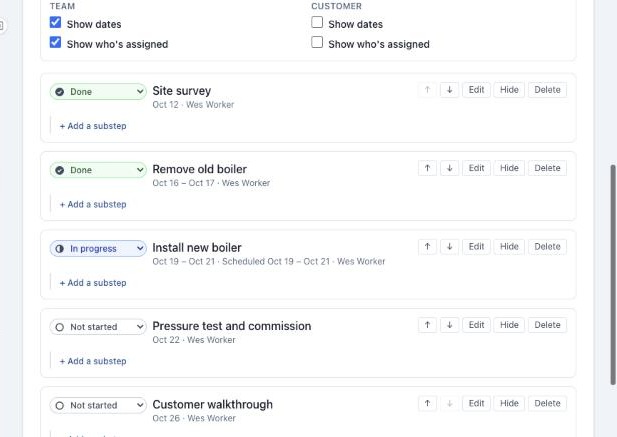
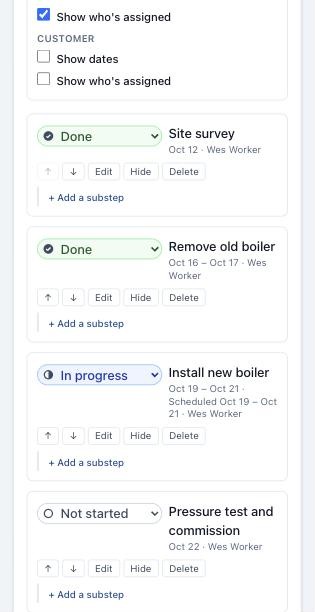
Break each job into steps and substeps with dates and people. Mark them Not started, In progress, or Done, and the progress bar keeps everyone honest.
What you get
- Choose what your team and your customer see, job by job
- Save a job as a template and reuse its steps next time
- Notes and files live on the job, where the crew will look
A board of every job
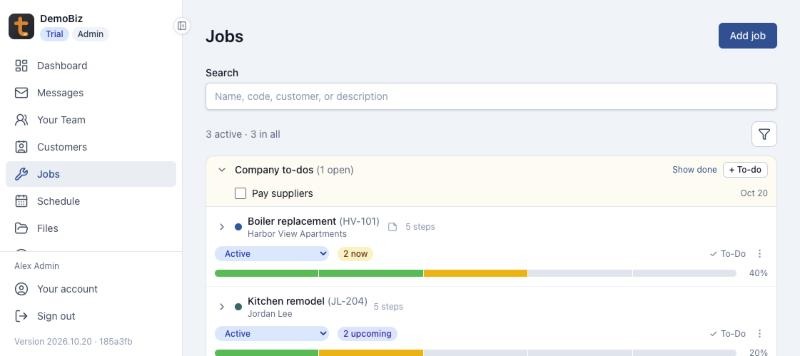
The Jobs page lists every job with its customer, its status, and a progress bar, with company to-dos at the top. Search by name, code, customer, or description.
Everything about the job in one place
Each job has its details (code, customer, rate, colour, billable or not), its steps, its notes, and its files. Jobs move from Active to Completed, Cancelled, or Archived.
Who sees what
Four switches per job decide whether your team and your customer see dates and who’s assigned. Steps and their status always show; customers never see estimated hours.
Templates
Save a job’s steps as a template, then add them to the next similar job in one go. Dates, people, and statuses start fresh.
More features
- Sales PipelineEvery job you’re chasing, and the next step on each.
- ScheduleSee who is where, all week.
- Cost SheetsPrice, materials, and labor hours, room by room.
- Time TrackerHours in, timesheets approved, payroll ready.
- MessagesTalk to your team and your customers in one place.
- FilesQuotes, plans, and photos, shared with the right people.
See Tailgate with your own jobs
Leave your email and phone number, and we'll walk you through a live demo business with real jobs, schedules, and timesheets.